
Maintenance Tips to Keep Your Punching Machine Game-Ready
- Routine maintenance checklist: daily to monthly tasks for reliable operation
- Daily quick checks before opening
- Weekly function tests and cleaning
- Monthly component and safety inspection
- Mechanical care: preserving the one-piece structure and moving parts
- Protecting the high-grade one-piece structure
- Pad surfaces, mounts, and shock-absorbing layers
- Motors, belts, and vibration actuators
- Electronics & sensor maintenance: keep scores accurate and reliable
- Understanding and caring for impact and accelerometer sensors
- Calibration: when and how to recalibrate scoring
- Power supply, grounding and EMI considerations
- Software, UI, and performance tuning: keep the experience engaging
- Applying firmware and game updates safely
- Touchscreen, HUD, and audio calibration
- Logging, diagnostics and remote monitoring
- Storage, seasonal care and longevity strategies
- Proper shutdown and winterization
- Replacing wear parts proactively
- Training staff and establishing SOPs
- Maintenance schedule at a glance
- Troubleshooting quick guide
- Score reads erratically
- No power or intermittent reboots
- Display or audio issues
- References and authoritative resources
- Frequently Asked Questions (FAQ)
- How often should I calibrate my punching machine?
- Can I clean the impact pad with household cleaners?
- My machine shows lower scores than before — is this a sensor problem?
- How long do key components typically last?
- Is remote monitoring worth the investment?
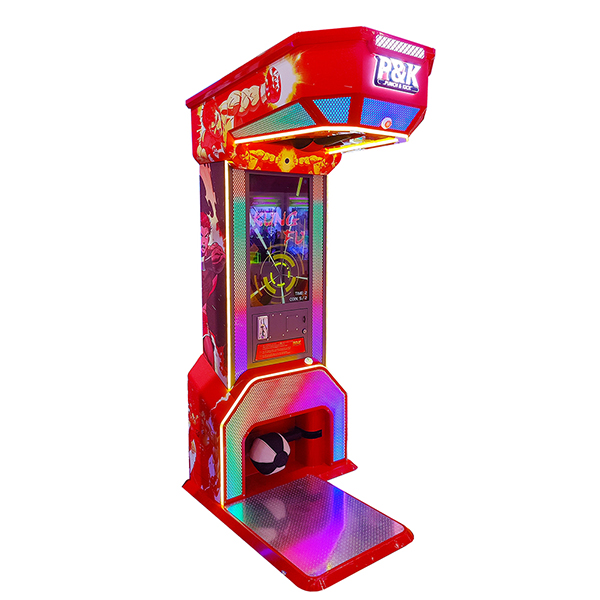
Keeping a punching machine game-ready means more than occasional cleaning. For commercial operators, arcades, gyms, or entertainment centers, proactive maintenance preserves scoring accuracy, reduces downtime, extends component life, and protects revenue. This guide provides field-tested maintenance procedures, sensor calibration tips, and safety checks specifically useful for modern boxing machines like the Neofuns Punch & Kick 2 Boxing Game Machine. Where helpful, we reference industry guidance and sensor technology basics to support best practices (Arcade games overview - Wikipedia; Accelerometer fundamentals - Wikipedia; ISO standards portal).
Product spotlight: Neofuns Punch & Kick 2 Boxing Game Machine — High-grade one-piece structure, stable and durable structure. High-definition game screens, combined with special effects and sound effects, achieve multi-dimensional enjoyment of vision, hearing, and touch, and indulge in the fun of punching and kicking.
Routine maintenance checklist: daily to monthly tasks for reliable operation
Daily quick checks before opening
Begin each business day with a five-minute walkaround. Verify the touchscreen or display powers on and the attract mode runs. Check that the punch pad and kick pad surfaces are free of debris, that cables are routed properly and not pinched, and that no obvious vibration or rattling is present when the machine is idling. Test a single play to confirm scoring registers within expected ranges.
Weekly function tests and cleaning
Once per week, perform a short functional inspection: validate that score readings are repeatable by delivering a few standardized strikes (use a consistent glove or padded tool). Clean external surfaces and the impact face with a damp microfiber cloth and a mild, non-abrasive cleaner—avoid solvents that can damage vinyl or screen coatings. Inspect vents and cooling fans for dust buildup and remove dust using low-pressure air or a soft brush.
Monthly component and safety inspection
Monthly checks should include fastener torque inspection (loose bolts are a common cause of noise and alignment shifts), visual inspection of wiring harnesses, and verification of emergency-stop or safety interlocks. If your machine has pneumatic or mechanical return systems for pads, inspect linkages and return springs for wear. Log findings in a maintenance register to support trend tracking and warranty claims.
Mechanical care: preserving the one-piece structure and moving parts
Protecting the high-grade one-piece structure
The Neofuns Punch & Kick 2 features a high-grade one-piece structure designed for stability. Structural maintenance focuses on preventing corrosion, minimizing impact-related deformation, and ensuring the cabinet remains square. Tighten structural fasteners to manufacturer torque recommendations and inspect weld seams and mounting brackets quarterly. For outdoor or high-humidity venues, use corrosion-inhibiting sprays on exposed metal and maintain indoor climate control when possible.
Pad surfaces, mounts, and shock-absorbing layers
Impact pads wear with time. Check padding for tears, compressive fatigue, or delamination. Replace outer pad covers that show cracking or splitting to prevent damage to internal sensors. Confirm that internal shock-absorbing layers and mounting plates are secure; loose mountings change response profiles and will affect scoring accuracy.
Motors, belts, and vibration actuators
If your unit includes vibration motors, belt drives, or return actuators, perform lubrication schedules as recommended by the vendor. Inspect drive belts for cracking or glazing; replace belts that show wear. Monitor motor current draw for unexpected rises, a common early indicator of bearing wear or friction. When available, follow manufacturer-supplied service intervals for replacing moving parts to avoid catastrophic failures during peak hours.
Electronics & sensor maintenance: keep scores accurate and reliable
Understanding and caring for impact and accelerometer sensors
Modern punching machines use impact sensors, strain gauges, or accelerometers to measure strike magnitude. Regularly check sensor connectors for corrosion and ensure cable shields are intact to avoid electromagnetic interference. For accelerometer-based systems, low-frequency drift can occur; periodic calibration (see next section) ensures readings map correctly to game scoring thresholds. Helpful technical background: Accelerometer - Wikipedia.
Calibration: when and how to recalibrate scoring
Calibration keeps the game fair and repeatable. Calibrate sensors under controlled conditions using standardized impact tools (calibration striker with a known mass/velocity or a calibration jig provided by the manufacturer). Document pre- and post-calibration readings and adjust scoring curves in the machine’s maintenance menu. For high-usage locations, perform a full calibration monthly; lower-usage sites can calibrate quarterly. Maintain calibration logs to demonstrate due diligence and to help troubleshoot player complaints.
Power supply, grounding and EMI considerations
Electrical noise can corrupt sensor signals. Verify the machine is connected to a stable, properly grounded supply and that surge protection is installed. Separate power cables from low-voltage sensor lines where possible. Use ferrite cores on key cable runs if intermittent misreads occur. Where legal liability or code compliance is required, reference ISO/IEC electrical safety guidelines via the standards portal (ISO).
Software, UI, and performance tuning: keep the experience engaging
Applying firmware and game updates safely
Software updates deliver bug fixes, scoring refinements, and new content. Back up configuration and score histories before applying firmware updates. Use only vendor-provided update packages and follow the upgrade procedure to avoid bricking the device. Schedule updates during off-hours to avoid lost revenue and allow for post-update verification testing.
Touchscreen, HUD, and audio calibration
High-definition game screens and audio cues are central to player satisfaction. Recalibrate touchscreens when players report missed inputs or when the cursor is offset. Inspect speaker grills for dust and test sound levels to ensure special effects remain punchy without distortion. Replace bulbs or LED backlights at end-of-life to avoid dim displays that reduce perceived quality.
Logging, diagnostics and remote monitoring
Enable built-in logs and diagnostic modes where available. Many modern arcade machines support remote telemetry for uptime, play counts, error reports, and ticket/coin drops. Remote monitoring speeds troubleshooting and can notify technicians when a fault threshold is reached. If integrating third-party monitoring, secure network access and follow vendor recommendations to avoid introducing vulnerabilities.
Storage, seasonal care and longevity strategies
Proper shutdown and winterization
For seasonal operations or long-term storage, power down according to manufacturer instructions. Remove batteries from accessory devices to prevent leakage. Store in a climate-controlled environment; avoid freeze-thaw cycles that can damage screens and seals. If reinstalling after storage, perform a full operational check and recalibration before returning the machine to service.
Replacing wear parts proactively
Create a replacement parts inventory: pad covers, belts, fuses, sensor cables, power supplies, and spare PCBs if available. A proactive parts replacement schedule based on play counts prevents extended downtime. Use supplier-recommended parts to preserve warranty and maintain scoring integrity.
Training staff and establishing SOPs
Well-trained staff reduce operator errors. Provide a short SOP (standard operating procedure) checklist for front-of-house staff: daily checks, how to reboot the machine safely, how to report faults, and which issues require escalation to a technician. Keep a laminated quick-reference next to the machine for staff and include a QR code linking to a digital manual.
Maintenance schedule at a glance
| Interval | Key Tasks | Why it matters |
|---|---|---|
| Daily | Power-on check, clean surfaces, quick play test | Detects immediate faults and ensures customer-ready appearance |
| Weekly | Functional test, dust vents, inspect cables | Prevents overheating and intermittent faults |
| Monthly | Fastener torque, sensor connector check, pad inspection | Maintains structural integrity and scoring reliability |
| Quarterly | Calibration, motor/belt inspection, software update check | Preserves accuracy and performance; reduces long-term wear |
| Annually | Full service: replace wear parts, deep clean, HVAC check | Extends life and prevents major downtime |
Troubleshooting quick guide
Score reads erratically
Possible causes: loose sensor connectors, EMI, worn padding changing impact signature. Actions: check connectors, reroute cables away from power lines, perform calibration with a standard striker, and inspect pad mounting.
No power or intermittent reboots
Check fuses, power supply output, and surge protector health. Verify internal power connectors are secure and test for overheating components. If the machine is connected to a smart power strip, bypass it to isolate the issue.
Display or audio issues
Reboot the game, test alternate inputs, and check brightness/contrast settings. For audio distortion, inspect speaker cones and test with known-good audio source. Replace speakers if mechanical damage is present.
References and authoritative resources
For general background on arcade systems and sensor technologies, see these resources:
- Arcade game — Wikipedia
- Accelerometer — Wikipedia (sensor fundamentals)
- ISO standards portal — International Organization for Standardization
Frequently Asked Questions (FAQ)
How often should I calibrate my punching machine?
For heavy-traffic venues, calibrate monthly. For moderate use, quarterly calibration is usually sufficient. Calibrate immediately after any mechanical repair, sensor replacement, or after noticing inconsistent scoring.
Can I clean the impact pad with household cleaners?
Use a mild, non-abrasive cleaner and a damp microfiber cloth. Avoid solvents, bleach, or abrasive pads that can degrade vinyl or damage sensors. If the pad cover is replaceable and heavily damaged, replace it rather than attempt aggressive cleaning.
My machine shows lower scores than before — is this a sensor problem?
Possibly. Lower readings can result from sensor drift, degraded shock-absorbing materials, or loose mounting hardware. Start with a visual inspection, check sensor connectors, and then perform a calibration. If the problem persists, consult a technician.
How long do key components typically last?
Component life depends on usage. Pads and covers may need replacement every 6–18 months in heavy-use locations. Belts, motors, and sensors often last multiple years but should be inspected and replaced proactively based on play counts and performance. Keep a spare-parts inventory to reduce downtime.
Is remote monitoring worth the investment?
Yes for multi-site operators. Remote monitoring reduces downtime by delivering early fault alerts, allowing faster maintenance dispatch, and providing usage analytics to optimize placement and service schedules.
If you need parts, calibration support, or on-site service for the Neofuns Punch & Kick 2 Boxing Game Machine, contact our support team or view the product page for specifications and replacement components. For immediate assistance, reach out to customer service or visit our product listing to order parts and schedule maintenance.
Contact support: Please email support@neofuns.com or call our service line. To view the Neofuns Punch & Kick 2 Boxing Game Machine, visit our product page.

Best Warm-up Routines Before Using a Boxing Arcade
The boxing machine score Cost Guide
How to Choose the mini boxing game manufacturer and supplier ?
Best coin punch machine manufacturers and supplier brands
FAQS
Who are we?
As a 20 years R&D experience manufacturer,we specialized in boxing game machines, holding 50+ patents.
How to ensure product quality?
The products are produced in strict accordance with the production process. All core accessories are fully inspected before going online. After production is completed, a non-stop aging test for at least 8-12 hours. It can only be packaged after being fully inspected and signed by QC teams. Stable quality, 2% failure rate, good customer reputation.
Whether to support samples?
Yes, the minimum order is 1 unit, and the customer pays the sample fee and shipping fee.
Can you provide corresponding prize purchasing services?
Yes, we provide prize options,one-stop shopping.
Can I customize special specifications and packaging?
Yes, we support customization of appearance, program, organization, etc.
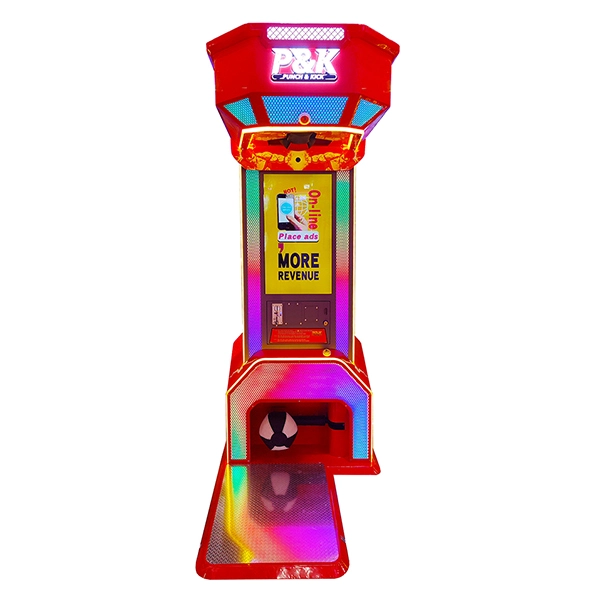
Neofuns Punch & Kick 2 Boxing Game Machine
High-grade one-piece structure, stable and durable structure. High-definition game screens, combined with special effects and sound effects, achieve multi-dimensional enjoyment of vision, hearing, and touch, and indulge in the fun of punching and kicking.

Neofuns Kids Boxing Punch Machine
The Kids Boxing Punch Machine is an interactive amusement device designed specifically for children, commonly found in amusement parks, shopping malls, or family entertainment centers. Its core function is to allow kids to test their strength, speed, and reaction abilities by punching a target.
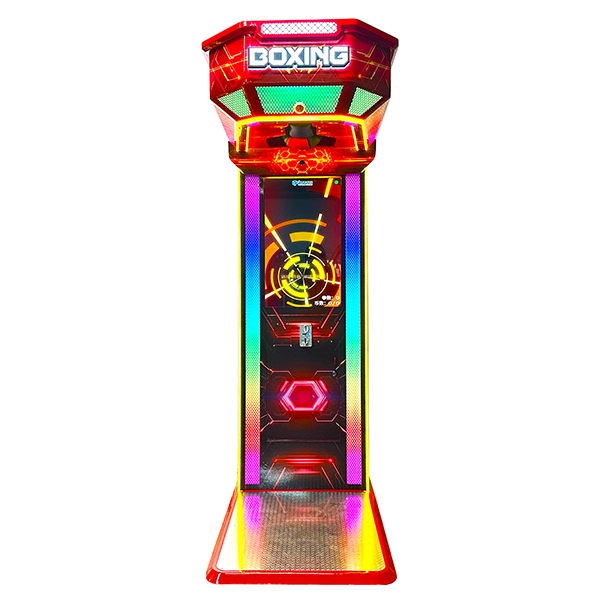
Neofuns Boxing Video Arcade Punching Game Machine
Experience the ultimate fusion of strength and technology with our cutting-edge boxing machine! At its heart lies a vibrant 32-inch HD display that reacts in real-time to every punch—tracking your speed, power, and accuracy with thrilling visuals.
Become the Champion: Shatter records? Our built-in auto-capture camera instantly films your victory moment and immortalizes you on the global leaderboard!
Compete & Conquer: Challenge friends worldwide. Your name in lights awaits!
Immersive Training: From precision drills to knockout games—crystal-clear graphics make every hit explosive.

Neofuns Boxing Champion Arcade Punching Game Machine
The colorful lights can make players immerse themselves in the punch of boxing, and every punch is a release of pressure; the digital scoreboard allows players to feel the sense of accomplishment brought by each punch, making people unable to stop and increasing your venue revenue; the customizable logo and stickers help you improve your brand awareness.
 +86 137 1928 7841
  sales@neofuns.com
Copyright © 2025 Neofuns. All Rights Reserved.
Instagram
Facebook
Youtube